The Holy Grail of Development Environments: My Journey to Nix
I am always bouncing between different projects and environments, whether it is for side projects, exploring new tools, or working on an article. Overall, I quickly got fed up with having to set up my local machine to adapt to each and every project. Then I started to use cloud environments like Gitpod and GitHub Codespaces extensively, where the environment itself is ephemeral and reproducible.
But that created another problem. While the cloud environment solves one aspect, it doesn’t really solve the local and CI environment problem. Managing toolchains still required two to three different configuration paradigms.
For a long time, my goal was to find a smart, reproducible way to manage my Ubuntu laptop alongside my various cloud environments. I think this is one of those ad-hoc challenges of eliminating the age-old “it works on my machine” problem—not just for my code, but when sharing a project, I don’t want to have to write prerequisite docs or scripts to set up the environment, nor force any user to use the same cloud environment as I do.
This is the story of that journey, the iterations I went through in my infra-bootstrap-tools repository, and how I finally found the holy grail: Nix.
Phase 1: The Docker Era
My first serious attempt at solving this problem was leaning heavily into containers. If everything ran in a container, it would run exactly the same everywhere, right? I created a system called docker_tools_alias.
The idea was simple: build a “massive”, portable Docker container with all the tools I needed (Terraform, Ansible, AWS CLI, Packer, etc.) pre-installed. Instead of installing tools natively, I aliased commands on my host machine to run inside the container.
Here is what that looked like under the hood in tools.sh:
drun ()
{
  docker run --rm "${TTY}" \
            -w /home/ubuntu \
            -v "$(pwd)":/home/ubuntu \
            -v ~/.ssh:/home/ubuntu/.ssh \
            -v ~/.aws:/home/ubuntu/.aws \
            -e AWS_PROFILE \
            "$INFRA_IMAGE_NAME" "$@"
}

dasb ()
{
  drun ansible "$@"
}
Whenever I typed dasb (Docker Ansible), it spun up the container, mounted my current directory, AWS credentials, and SSH keys, and executed the command.
While this gave me a portable environment, the reality was less than ideal. A toolchain container quickly becomes a “Frankenstein” with too many tools and dependencies, and executing commands felt sluggish due to container startup overhead. Furthermore, integrating this containerized approach into CI pipelines often meant wrestling with Docker-in-Docker complexities and clunky volume mounts.
It was portable, but it wasn’t graceful.
Phase 2: The Bash Era (ibt)
Realizing Docker wasn’t the silver bullet for local tooling, I pivoted. I decided to build a custom CLI framework using Bash, which I dubbed ibt (infra-bootstrap-tools).
This script acted as a central dispatcher for setting up the environment. You could run ibt setup and it would pull down binaries, configure paths, install Python virtual environments, and get you ready to code.
To its credit, ibt worked surprisingly well. It integrated seamlessly with Gitpod and Codespaces, and I even used it successfully in CI pipelines. However, the maintenance burden grew rapidly. It would never be a cross-platform utility or solid framework because I always worked with Ubuntu-based environments.
I just didn’t quite like the maintenance overhead for this approach and didn’t feel like a shareable solution that anyone could use. It was not a product, just a collection of scripts to bridge the installation gap for the underlying package manager.
It worked across the board, but it wasn’t graceful.
Phase 3: The Nix Discovery and shell.nix
I knew there had to be a better way to declare dependencies without heavy containers or shell scripts. That’s when I discovered Nix.
I was immediately seduced by nix-shell. It seemed like the perfect compromise. With a single shell.nix file, I could define exactly which packages and versions my project needed. Gone is the installation doc; I can simply ask users to run nix-shell on our bin/nix/shell.nix and they get the exact same environment as I have. This includes the same Python version and libraries installed in a Python virtual environment.
# bin/nix/shell.nix
{ pkgs ? import <nixpkgs> {} }:

pkgs.mkShell {
  buildInputs = [
    pkgs.git
    pkgs.docker
    pkgs.python3
  ];

  shellHook = ''
    echo "Welcome to the Nix development environment!"
  '';
}
That’s a very basic example, but it illustrates the core concept: declaratively define your environment in a single file, and let Nix handle the rest.
And it can scale incredibly well. To keep my monolithic repository organized without creating a massive, bloated default environment, I designed a dynamic setup. Instead of one big env setup, I was able to create different profiles that I can use depending on which part of the project I am working on. For example, if I am working on the Python part of the project, I can use the Python profile, and if I am working on the Ansible part of the project, I can use the Ansible profile.
Nix shells are very quick to start since Nix is caching the dependencies in the Nix store. It uses shims to make the dependencies available in the shell without actually copying or redownloading them. The Nix language and system by itself is a very interesting piece of engineering and would deserve its own walkthrough, but using it is very straightforward and we don’t need to bother with those details for now.
However, let’s dive a little bit more into the “profiles” idea since it is the key to dealing with monorepos and light CI environments. The idea is simple: define basePackages and pythonPackages for example, and then use pkgs.lib.optionalString to conditionally inject Python virtual environments or install Ansible dependencies only when a specific shell variant is requested.
Here is the key excerpt from bin/nix/common.nix (simplified for illustration):
  # --- Package Bundles ---
  basePackages = with pkgs; [ git docker pre-commit tenv terraform-docs ];
  pythonPackages = with pkgs; [ python3 python3Packages.pip python3Packages.yamllint ];

  # --- Shell Hook Generator ---
  # Returns a bash script string that Nix will execute upon entering the shell.
  mkShellHook = {
    name,
    withVenv ? false,
    withAnsibleGalaxy ? false,
    ...
  }: ''
    echo "Entering ${name} development shell..."
    ${lib.optionalString withVenv ''
      if [ ! -d ".venv" ]; then python -m venv .venv; fi
      source .venv/bin/activate
    ''}
    ${lib.optionalString withAnsibleGalaxy ''
      ansible-galaxy install -r requirements.yml
    ''}
  '';
By defining a factory function (mkShellHook), we can conditionally inject Python virtual environments or install Ansible dependencies only when a specific shell variant is requested. As you can see, we are not managing all dependencies with Nix. Only the tools are handled that way, so that our environments continue to use the “standard” way of a given ecosystem to deal with dependencies: Python with requirements.txt or pyproject.toml, and Ansible with requirements.yml.
This modular setup is then consumed by a very lightweight entrypoint in bin/nix/shell.nix:
# Traditional nix-shell entrypoint for backward compatibility.
# Allows entering targeted environments: `nix-shell --argstr shell ansible bin/nix/shell.nix`
{ shell ? "default" }:
let
  nixpkgs = import <nixpkgs> {
    config = (import ./common.nix { pkgs = nixpkgs; }).nixpkgsConfig;
  };
  common = import ./common.nix { pkgs = nixpkgs; };
in
nixpkgs.mkShell common.shells.${shell}
The whole point of splitting shell.nix and common.nix is to be able to use Nix Flakes, which you will discover in a later section (the new improved Nix shell experience).
In sum, with this architecture, developers can jump into the default environment with a simple nix-shell bin/nix/shell.nix. Or, if they are working on Ansible tasks, they can request the specific shell variant: nix-shell --argstr shell ansible bin/nix/shell.nix. The environment automatically bootstraps everything—completely eliminating the need for my massive ibt bash scripts!
Phase 4: Going Deep with home-manager
Once I saw the power of Nix at the project level, I wanted that same declarative magic for my personal laptop. I have always wanted a declarative solution to manage my entire system configuration and personal preferences.
This is why I jumped on the occasion to try home-manager. It’s a Nix tool for managing your home directory declaratively. So I adopted home-manager to manage my Ubuntu laptop’s configuration and personal tools declaratively. In my my-home-manager repository, my core development tools—like zsh, direnv, git, and my 1Password SSH integration—are completely codified.
Just like in the nix-shell experience, I declare everything I need globally in a few lines:
  # 1. Declare the tools I want installed globally
  home.packages = [
    pkgs.git pkgs.zsh pkgs.vscode pkgs.docker
    pkgs.uv pkgs.just pkgs._1password-cli pkgs._1password-gui
  ];
Then I configure my shell environment (pretty much like bashrc or zshrc). As a matter of fact, home-manager is building my .zshrc file automatically for me and configuring most of the tools, removing most of the work of updating configs in the ~/.config folder.
For instance, configuring your Git profile with Nix looks like this:
  # 2. Configure Git with 1Password SSH signing
  programs.git = {
    enable = true;
    settings = {
      user = { name = "xNok"; email = "[EMAIL_ADDRESS]"; };
      gpg = { format = "ssh"; };
      "gpg \"ssh\"" = {
        program = "${lib.getExe' pkgs._1password-gui "op-ssh-sign"}";
      };
      commit = { gpgsign = true; };
    };
  };
If I get a new laptop tomorrow, applying this configuration guarantees my entire terminal and Git workflow are identical to what I had yesterday. I version my configuration to git so whenever I reinstall Ubuntu to a newer version, not to worry, I can recover my setup in no time.
Phase 5: The Ultimate Setup (Flakes)
While nix-shell was great, the real game-changer arrived with Nix Flakes.
Flakes standardized how Nix projects are structured and provided built-in lockfiles (flake.lock) like any good package manager, bringing the immutable packages principle to the heart of any good dev environment.
With Flakes, we can now dynamically expose targeted shell profiles for different workflows directly in my flake.nix:
      {
        # Dynamically create shell endpoints (`nix develop .#<name>`)
        # by mapping over the configurations defined in our common.nix file.
        # This keeps our flake.nix extremely clean.
        devShells = pkgs.lib.mapAttrs (_: shell: pkgs.mkShell shell) common.shells;
      }
Running nix develop will give you the default shell; this is probably what most people will use in a project and it is honestly good enough for most use cases.
But going one step further, we also implemented profiles and the command becomes much shorter: nix develop .#ansible vs the convoluted nix-shell --argstr shell ansible bin/nix/shell.nix.
Bridging the IDE Gap with Direnv
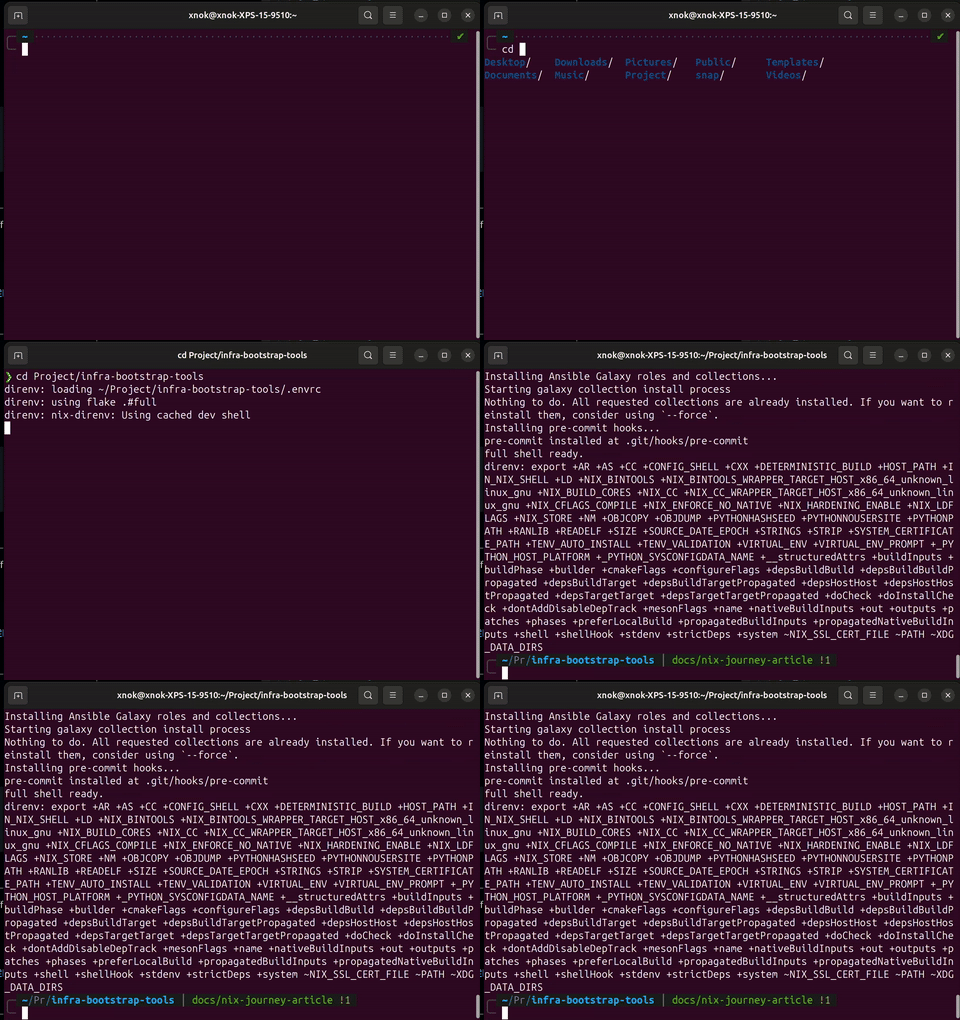
While running nix develop manually is great, the absolute pinnacle of this setup is automating it with direnv. By adding a simple .envrc file to the root of the project containing use flake .#full, direnv bridges the gap between my IDE and Nix. You can use just use flake to load the default shell instead, but this repo opts into the full shell to get every tool available.
Whenever I navigate into the project directory, or whenever I open a new terminal directly inside VSCode, direnv automatically evaluates the flake and seamlessly loads all my tools into the environment. I never have to explicitly activate my environment—it’s just instantly ready the second I open the project.
Phase 6: Nix in GitHub Actions
This was really the final piece of the puzzle for integrating Nix Flakes into my GitHub Actions pipelines. By using the exact same flake.nix environment in CI that I use locally, I achieved 100% environment parity. No more “it passes locally but fails in CI because the runner has a different version of Ansible.”
GitHub Actions has fantastic community support for Nix. We can use the official Determinate Systems action to install Nix in seconds. Then, using nix develop, we can run our CI scripts (like make test via our Makefile) in the exact same environment as our local machines:
jobs:
  test:
    runs-on: ubuntu-latest
    steps:
      - uses: actions/checkout@v4

      - name: Install Nix
        uses: DeterminateSystems/nix-installer-action@main

      - name: Run tests in Nix shell
        run: nix develop .#default --command make test
This ensures that our CI pipelines are as reproducible as our local development environments.
Conclusion
It took several iterations—from clunky Docker containers to massive Bash scripts—but I finally achieved the holy grail of developer experience: “same config, same env in local, cloud env, and CI.”
Nix is simple to use, the configuration syntax is not that hard to get used to and is quite readable. The ecosystem is mature and constantly improving, and Nix has probably much more to offer than the use cases I’ve described above. As a matter of fact Nix was built to create declarative and reproducible system configurations with a dedicated programming language. But no need to become an expert in Nix to use it. You can start small with nix-shell and more generally Nix flakes and you will have all you need.
Relevant Resources
If you want to dive deeper or replicate this setup yourself, here are some helpful links:
- Our Internal Nix Documentation: A step-by-step guide on how we structure our
common.nix,shell.nix, andflake.nixin this repository. infra-bootstrap-toolsSource Code: The home of our declarative setups.my-home-managerGitHub Repo: My personal declarative dotfiles and laptop setup.- A Walkthrough of My Home Manager Config: A deep-dive into each section of my
home.nix, with rationale and lessons learned. - Nix Official Documentation: The best place to start learning Nix.
- Home Manager: Manage your user environment securely and declaratively.
- Direnv Official Site & nix-direnv: The fast, persistent integration to bridge the gap between Nix and your IDE.